| Circos {SMRUCC.genomics.Visualize.Circos.Configurations} | .NET clr documentation |
Circos
Description
circos.conf
                                     ____ _
                                    / ___(_)_ __ ___ ___  ___
                                   | |   | | '__/ __/ _ \/ __|
                                   | |___| | | | (_| (_) \__ \
                                    \____|_|_|  \___\___/|___/

                                                round Is good

 circos - generate circularly composited information graphics
(Circo基因组绘图程序的主配置文件)
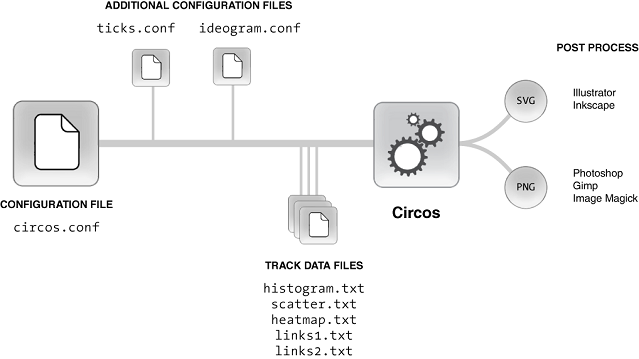
Typically a central configuration file which defines data track information (circos.conf) imports other configuration files that store parameters that change less frequently (tick marks, ideogram size, grid, etc).
Data for each data track Is stored in a file And the same file can be used for multiple tracks.
PNG image output Is ideal For immediate viewing, web-based reporting Or presentation.
SVG output Is most suitable For generating very high resolution line art For publication And For customizing aspects Of the figure.
Declare
# namespace SMRUCC.genomics.Visualize.Circos.Configurations
export class Circos extends CircosConfig {
   chromosomes: string;
   chromosomes_breaks: string;
   # The color of each ideogram is taken from the karyotype file. To change it, use 'chromosomes_color'.
   chromosomes_color: string;
   # The default behaviour is to display all chromosomes defined in the karyotype file. In this example, I Select only a subset.
   #
   # The 'chromosomes' parameter has several uses, and selecting which chromosomes To show Is one Of them. You can list them
   #
   #
   #  hs1;hs2;hs3;hs4
   #
   #
   # Or provide a regular expression that selects them based On a successful match
   #
   #
   #  /hs[1-4]$/
   #
   #
   # The $ anchor Is necessary, otherwise chromosomes Like hs10, hs11 And hs20 are also matched.
   chromosomes_display_default: string;
   chromosomes_order: string;
   # The default radial position for all ideograms is set by 'radius' in the <ideogram> block (see ideogram.conf). To change the value For specific ideograms, use chromosomes_radius.
   chromosomes_radius: string;
   # By default, the scale progression is clockwise. You can set the Global angle progression Using 'angle_orientation' in the <image> block (clockwise Or counterclockwise). To reverse it For one Or several ideograms, use 'chromosomes-reverse'
   chromosomes_reverse: string;
   # The size of the ideogram on the figure can be adjusted using an absolute Or relative magnification. Absolute scaling,
   #
   #
   #  hs1=0.5
   #
   #
   # shrinks Or expands the ideogram by a fixed factor. When the "r" suffix Is used, the magnification becomes relative To the circumference Of the figure. Thus,
   #
   #
   #  hs1=0.5r
   #
   #
   # makes hs1 To occupy 50% Of the figure. To uniformly distribute several ideogram within a fraction Of the figure, use a regular expression that selects the ideograms And the "rn" suffix (relative normalized).
   #
   #
   #  /hs[234]/=0.5Rn
   #
   #
   # Will match hs2, hs3, hs4 And divide them evenly into 50% Of the figure. Each ideogram will be about 16% Of the figure.
   chromosomes_scale: string;
   # The chromosomes_unit value is used as a unit (suffix "u") to shorten values In other parts Of the configuration file. Some parameters, such As ideogram And tick spacing, accept "u" suffixes, so instead Of
   #
   #
   #  spacing = 10000000
   #
   #
   # you can write
   #
   #
   #  spacing = 10u
   chromosomes_units: string;
   colors: OverwritesColors;
   filePath: string;
   # 内置 GDI+ 绘图引擎所使用的 DPI(同样不会参与 circos.conf 的序列化输出,仅用于 GdiPlus.GdiRender)
   GdiPlusDpi: integer;
   # 内置 GDI+ 绘图引擎所使用的画布尺寸。
   #
   # 这个属性没有使用 CircosAttribute 标记,所以它不会被序列化到 circos.conf 配置文件之中(不会影响到命令行调用 circos 的既有流程), 仅用于 GdiPlus.GdiRender 在没有显式指定渲染参数的时候确定输出图像的尺寸。
   GdiPlusImageSize: Size;
   genome: string;
   # 获取到被包含在主配置文件之中的 ideogram 配置块
   Ideogram: IdeogramInclude;
   includes: iterates(CircosConfig);
   # The basically genome structure plots: Chromosome name, size and color definition.(基本的数据文件)
   karyotype: string;
   main: Circos;
   MimeType: ContentType[];
   # Gets the number of the tracks that defined in this circos model
   numberOfTracks: integer;
   # 内部元素是有顺序的区别的
   Plots: ITrackPlot[];
   refPath: string;
   show_heatmap: string;
   show_heatmaps: string;
   show_highlight: string;
   show_highlights: string;
   show_histogram: string;
   show_line: string;
   show_links: string;
   show_scatter: string;
   show_text: string;
   show_tile: string;
   # The genome size.(基因组的大小,当Circos.skeletonKaryotype为空值的时候返回数值0)
   size: integer;
   # 基因组的骨架信息
   skeletonKaryotype: KaryotypeSkeleton;
   track_start: string;
   track_step: string;
   track_width: string;
   use_rules: string;
}
.NET clr type reference tree
- this class extends from CircosConfig class: CircosConfig
- use by property member
colors: OverwritesColors - use by property member
GdiPlusImageSize: Size - use by property member
Ideogram: IdeogramInclude - use by property member
includes: iterates(CircosConfig) - use by property member
main: Circos - use by property member
MimeType: ContentType - use by property member
Plots: ITrackPlot - use by property member
skeletonKaryotype: KaryotypeSkeleton
[Package {$package} version {$version} Index]